ChatGPT is becoming a place where consumers are using it to research companies, compare services, evaluate products, and decide who they may want to do business with.
OpenAI introduced Businesses in ChatGPT so companies have a way to optimize their experience directly. Business Hub launched in November 2026, giving eligible companies the ability to claim a business profile, verify their connection to the company, update key business information, and see new visibility data such as mentions and website clicks.
If you are familiar with Google Business Profile, formerly Google My Business, there are some obvious similarities. You are claiming a profile associated with your company, confirming that you are authorized to manage it, and providing accurate information that the platform can use when presenting your business to potential customers.
ChatGPT Business Hub is not simply a new version of Google Business Profile, and claiming your profile does not guarantee that ChatGPT will recommend your company more often. Think of it as another top source of verified business information that should now be part of your broader SEO and AI visibility strategy. OpenAI has specifically stated that claiming a profile does not guarantee increased visibility or direct control over ChatGPT recommendations.
Below, we walk through the process we used to claim JELY Marketing’s ChatGPT business profile, including the domain verification process, OpenAI’s review, identity verification, and what you can manage after your claim is approved.
What Is ChatGPT Business Hub?
Business Hub is the area within ChatGPT where business owners and authorized representatives can claim and manage eligible company profiles.
Once your claim and required verification are complete, Business Hub can allow you to maintain business details, monitor how ChatGPT is referencing your company, invite additional administrators, and, for eligible businesses, set up a Business Agent that can answer customer questions.
Businesses do not have to participate in ChatGPT advertising or purchase an enterprise-level plan to manage an eligible company profile. Profile ownership is separate, while advertising and the optional Business Agent are additional tools businesses can choose to use separately.
Just as we would never tell a client that opening a Google Ads account automatically improves their organic SEO rankings, businesses should not assume that claiming a ChatGPT profile automatically improves their visibility in AI-generated answers. What it does give you is more control over the information you provide directly to OpenAI.
Why Should Businesses Claim Their ChatGPT Profile?
If ChatGPT is already discussing your company, your services, or businesses within your industry, you should ensure that the information associated with your company is accurate.
Claiming your business gives you a direct way to manage information such as your business category, description, website, logo, and other available profile details after verification. OpenAI may still reference other sources when generating answers, so Business Hub should be treated as one part of your overall digital presence rather than the only source ChatGPT uses.
Your company name, website, services, location information, social profiles, business listings, structured data, and the content on your own website should all be consistent. Just like in SEO, NAP will play a role in your AI rankings as well.
We have discussed this broader shift before in our guide to Google AI Mode SEO and how AI search is changing visibility. AI platforms are changing where consumers conduct research, but the fundamentals of a strong digital presence still apply.
What You Need Before Claiming Your Business
Before opening Business Hub, gather the information and access you may need to complete the process.
Depending on the verification methods available for your business, you may need access to:
- Your business phone
- Business email
- Website domain’s DNS settings
- Shopify account
You should also have your legal business information available. During the later identity verification process, OpenAI may request:
- Government-issued ID
- Business registration information
- Your legal business name
- Registered address
- Proof that you are authorized to represent the company
If an employee, marketing agency, or another representative is completing the process, make sure that person is authorized to manage the business.
How to Claim Your Business on ChatGPT Business Hub
Step 1: Open Business Hub and Search for Your Company
Log in to ChatGPT using the account that will manage the company profile, then access the Business Hub from the sidebar menu.
From here, search for your business name.
If ChatGPT already has a profile that matches your company, select the appropriate listing. Eligible online businesses may also see an option to create a new business profile if one does not already exist.
OpenAI notes that availability can vary based on business type and location. Existing U.S. local stores and restaurants currently follow a somewhat different claiming process than eligible online businesses.

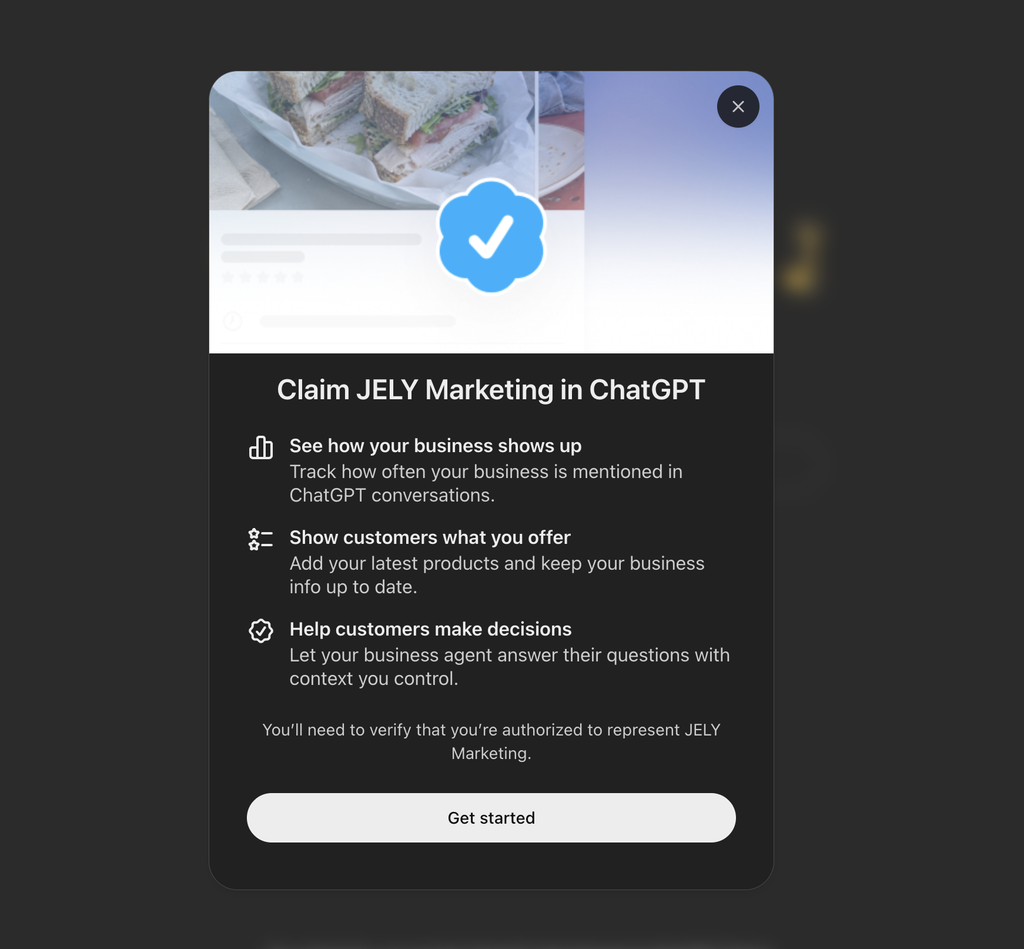
Step 2: Select the Business and Start Your Claim
Once you locate the correct business profile, select it and begin the claim process.
ChatGPT will ask you to confirm the account that will manage the business.
For JELY, our existing Miami business listing appeared in the search results, allowing us to begin the claim directly instead of creating a new profile.
Step 3: Choose a Business Verification Method
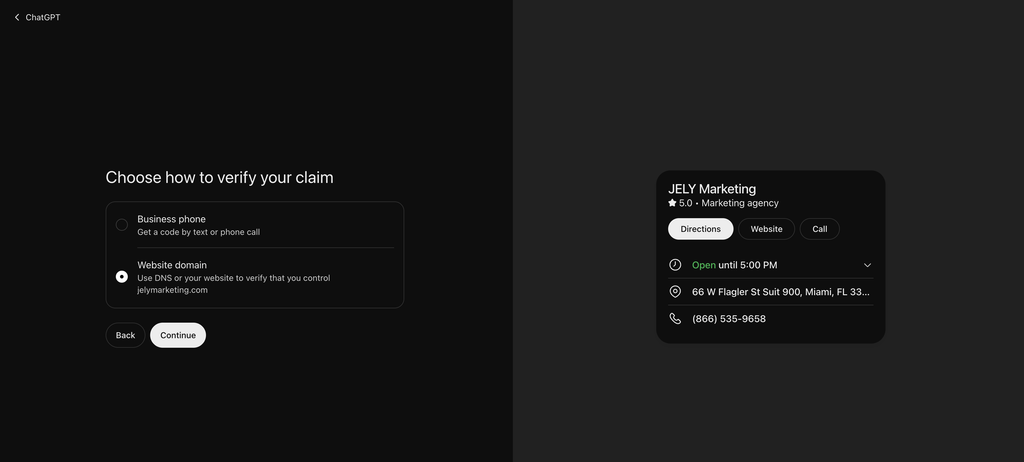
ChatGPT may offer one or more ways to verify your relationship with the company.
Available methods can include:
- Business phone verification through SMS or an automated call
- Business email verification
- Website domain verification
- Connecting a Shopify store
The methods available will depend on the listing.
For JELY Marketing, we chose website domain verification because we have direct control over jelymarketing.com and its DNS settings.
Step 4: Verify Your Website Domain With a DNS TXT Record
If you choose website domain verification, ChatGPT will generate a TXT record that needs to be added to your domain’s DNS settings.
You will be given three pieces of information:
- The record type
- The name or host
- The verification value or content
Log into the platform that manages your DNS records and create a new TXT record using the information ChatGPT provides. Copy the values exactly as displayed.
Do not replace unrelated TXT records already associated with your domain. You are adding a new record specifically for ChatGPT’s domain verification.
DNS changes can take time to propagate. Once the record is live, return to ChatGPT and select Verify domain.
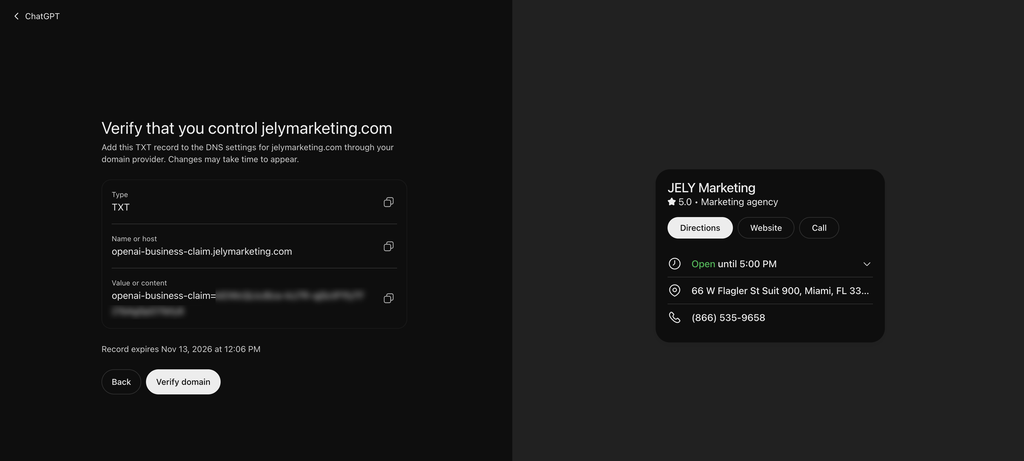
Based on your DNS provider, you may need to make changes to the “Name or host” section of the TXT record. For example, we use Squarespace and needed to remove our domain URL from the end of the code. If you are unsure, please contact your web provider.
Successfully verifying the website domain confirms that you control the domain. It does not complete the entire identity verification process.
Step 5: Wait for OpenAI to Review the Claim
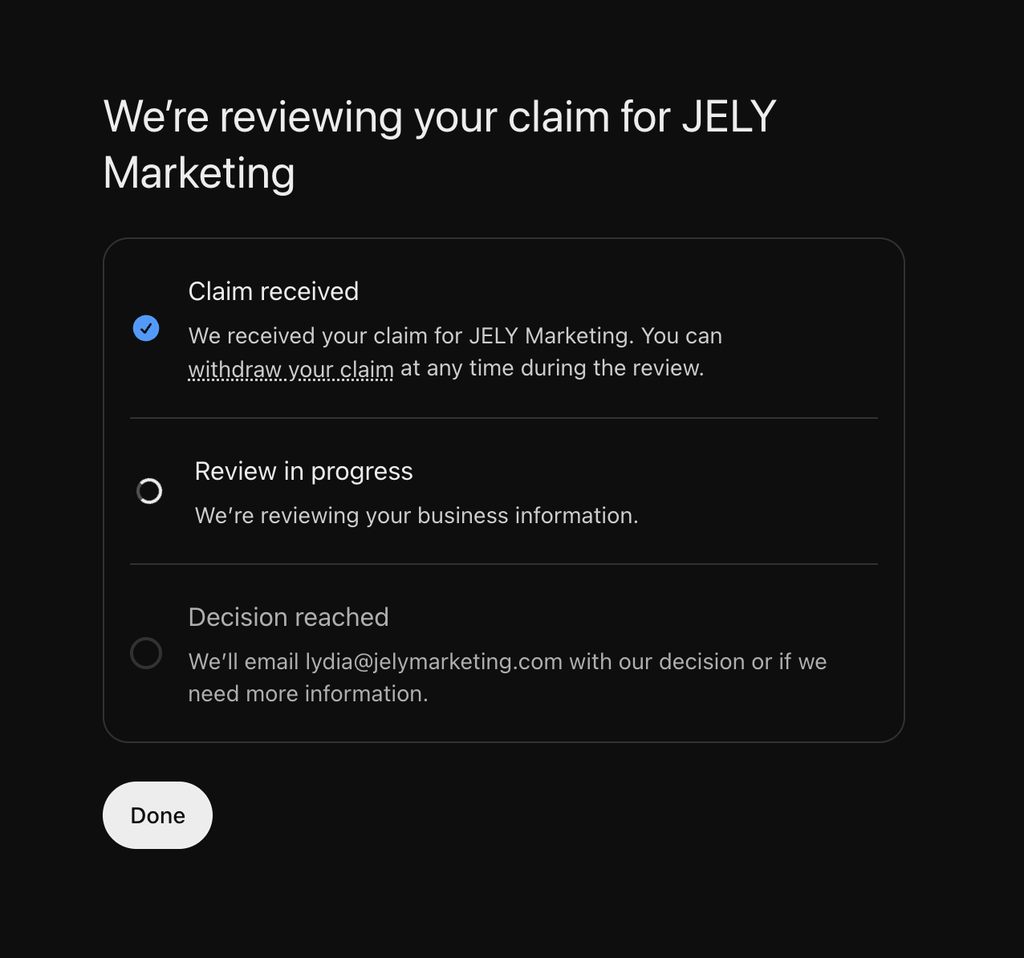
After submitting the initial claim, OpenAI reviews the information.
Your Business Hub profile will display the status of the claim, such as Claim received or Review in progress.
OpenAI will email you when a decision has been reached or if additional information is required. Review times can vary, so there is no universal approval timeline, but ours only took a few minutes.
Step 6: Your Business Claim Is Approved!
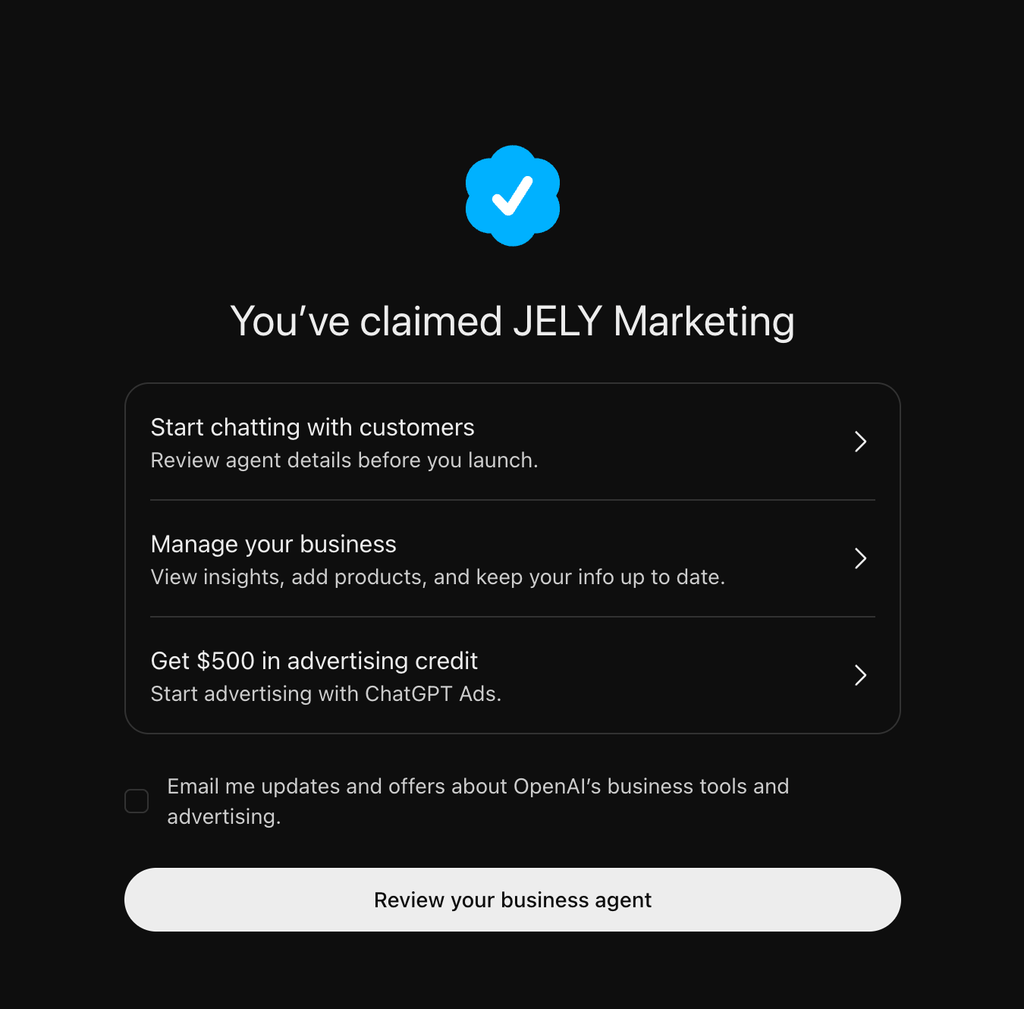
Once approved, the profile becomes associated with your ChatGPT account.
For JELY, the approval screen confirmed that we had successfully claimed JELY Marketing and gave us access to the next Business Hub options.
Depending on the account and available features, you may see options related to managing your business, reviewing your Business Agent, or advertising.
Your Business Is Claimed. Now Complete Persona Verification
After JELY’s claim was approved, Business Hub displayed another verification requirement:
Verify your identity with a government-issued ID.
OpenAI uses Persona for this stage of verification.
Claim verification proves your connection to the business. Persona verification confirms the identity of the person representing it. Persona approval is required before you can publish changes to business information, access profile insights, connect certain product information, or create an eligible Business Agent.

During this process, you may be asked for information such as your government-issued identification, legal business name, DBA or trade name, business structure, physical and registered business addresses, website, and business registration or tax information.
Make sure this information matches your official business records.
After submitting the verification, OpenAI reviews the information and may either approve it or request additional details.
What Can You Update After Verification?
Once the claim and Persona verification are approved, you can begin managing the information associated with your ChatGPT business profile.
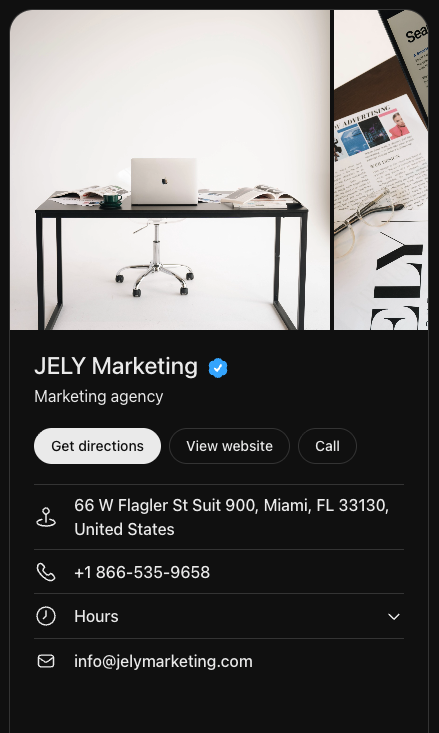
OpenAI currently lists profile fields including your website, business description, product or service category, logo, cover photo, and other optional business information. Depending on the type of business and fields available on your profile, you may also see contact details, business hours, photos, and other information relevant to the listing.
This is where your SEO/AEO strategy comes into play.
Choose the Most Accurate Business Category
Your category should describe your core service offerings. While Google Business Profiles allow you to select multiple sub-categories, OpenAI only allows for one category.
For JELY Marketing, that means a category such as Marketing Agency rather than trying to select every individual service we offer.
Supporting services can then be reinforced through the business description and the rest of your online presence.
Write an Optimized Business Description
The business description is not a place to stuff keywords. Use it to explain what your company does, where you operate, who you serve, and the core products or services customers should associate with your brand.
For example, a law firm should identify its primary practice areas. A medical practice should describe its specialties. A roofing company should explain its primary roofing services and service area.
This is the same principle we use when developing website content. Clear, descriptive content makes it easier for both people and machines to understand what a business actually does.
For more on that approach, see our SEO Guide covering keywords, search intent, technical SEO, and AI visibility.
Confirm Your Contact Information and Website
Check the business phone, business email, website domain, address, and other identifying information.
If ChatGPT is one of several sources consumers use to research your company, inconsistent information creates unnecessary confusion, especially for local businesses.
Add Your Logo, Photos, and Available Business Details
Complete as much of the profile as is relevant to your business.
Your logo and images reinforce brand recognition, while details such as business hours and contact information can help customers determine whether and how to reach you.
OpenAI reviews changes before publishing them, so an update may not appear immediately in the business profile or in ChatGPT answers.
Business Hub Also Gives You New ChatGPT Visibility Data
One of the most important parts of ChatGPT Business Hub is the Insights section.
After your claim and Persona verification are approved, OpenAI says businesses can view aggregate activity from the previous 28 days, including mentions, website clicks, and discovery topics:
- For an online business, a mention is counted when ChatGPT references the company’s website. Simply mentioning the brand name does not necessarily count.
- For a local business, a mention can count when ChatGPT displays that business location as a result.
- Website clicks show how often users clicked through to your site, while discovery topics identify broader themes associated with answers where your company was cited or mentioned.
Businesses do not receive individual customer conversations or private prompts. The reporting is aggregated.
For marketers, this gives us another dataset to begin incorporating into AI visibility reporting.
It should not replace Google Analytics, Search Console, conversion tracking, or traditional SEO measurement. Instead, it adds another layer showing how a brand is appearing within a growing customer research channel.
Can You Give Your Marketing Agency Access?
Yes.
The administrator who claims the business can invite teammates and, where supported, grant an agency access to manage the business or its Business Agent. OpenAI recommends that each person use their own ChatGPT account rather than sharing credentials.
For businesses working with an SEO or digital marketing agency, this is the route we would recommend.
The business should retain ownership of its profile while giving the appropriate marketing team access to maintain the information and monitor performance.
What Is a ChatGPT Business Agent?
A Business Agent is separate from your standard business profile.
For eligible U.S. ecommerce and online service businesses, OpenAI currently allows companies to create an agent that can answer customer questions using business information provided by the company.
A business might use an agent to explain products, policies, availability, or other frequently asked questions. Businesses can preview the agent, test common customer questions, adjust the information it uses, and publish it when ready.
The Business Agent does not currently complete purchases, bookings, or order lookups itself. It can provide information and direct customers to the company’s website to complete those actions.
You can claim and maintain your ChatGPT business profile without creating a Business Agent or running ChatGPT Ads.
If advertising is what you’re interested in, we recently broke down how to advertise on ChatGPT without replacing your Google Ads strategy.
Does Claiming Your ChatGPT Business Profile Help With SEO?
Yes. Claiming your business profile should be as important as claiming your Google Business Profile. Claiming your profile does not guarantee increased visibility or give the business direct control over ChatGPT’s independent recommendations, but gaining those insights on a regular basis will help in your overall digital marketing strategy. Running ads also does not influence ChatGPT’s independent answers.
SEO teams need to care because accurate business information matters.
Business Hub creates another source where your company can directly provide information about who you are, what you offer, and where customers can find you.
At the same time, OpenAI states that ChatGPT may continue using other sources when answering questions about your business.
That means your website still matters.
Your Google Business Profile still matters.
Your citations still matter.
Your schema still matters.
Your reviews, content, authority, brand mentions, and consistency across the web still matter.
ChatGPT Business should become another part of that ecosystem.
ChatGPT Business Is Another Piece of the AI Visibility Puzzle
Search behavior is no longer isolated to Google. Consumers are researching businesses across traditional search engines, social platforms, maps, review sites, and now conversational AI platforms.
That does not mean businesses should abandon the fundamentals every time a new platform launches. It means the fundamentals need to travel with you:
- Claim your profile
- Verify your business
- Keep your business details accurate
- Make sure your website explains what you do
- Build authoritative content
- Maintain consistent information across your digital footprint
- Measure whether people are reaching your site and converting.
Then continue adapting as the platforms evolve.
ChatGPT Business Hub is extremely new, and we expect the feature set and claiming process to continue changing. Search Engine Journal’s initial walkthrough also notes that different business types may currently see different paths and options during setup.
As marketers, that is why we are testing these tools ourselves before recommending them to clients.
At JELY Marketing, AI visibility is increasingly being incorporated into the same SEO strategy we use to improve traditional search performance. We are looking at how businesses appear across AI-assisted search experiences, how their websites communicate authority, and whether the information AI platforms find is accurate enough to confidently represent the brand.
Claiming your ChatGPT business profile is a simple place to start.
For the most current setup requirements, review OpenAI’s official guide to setting up your business on ChatGPT. You can also review Search Engine Journal’s firsthand Business Hub walkthrough for another example of the process.
If you need help understanding where your business is appearing across traditional and AI-driven search, contact JELY Marketing to discuss an SEO and AI visibility strategy built around your actual business goals.